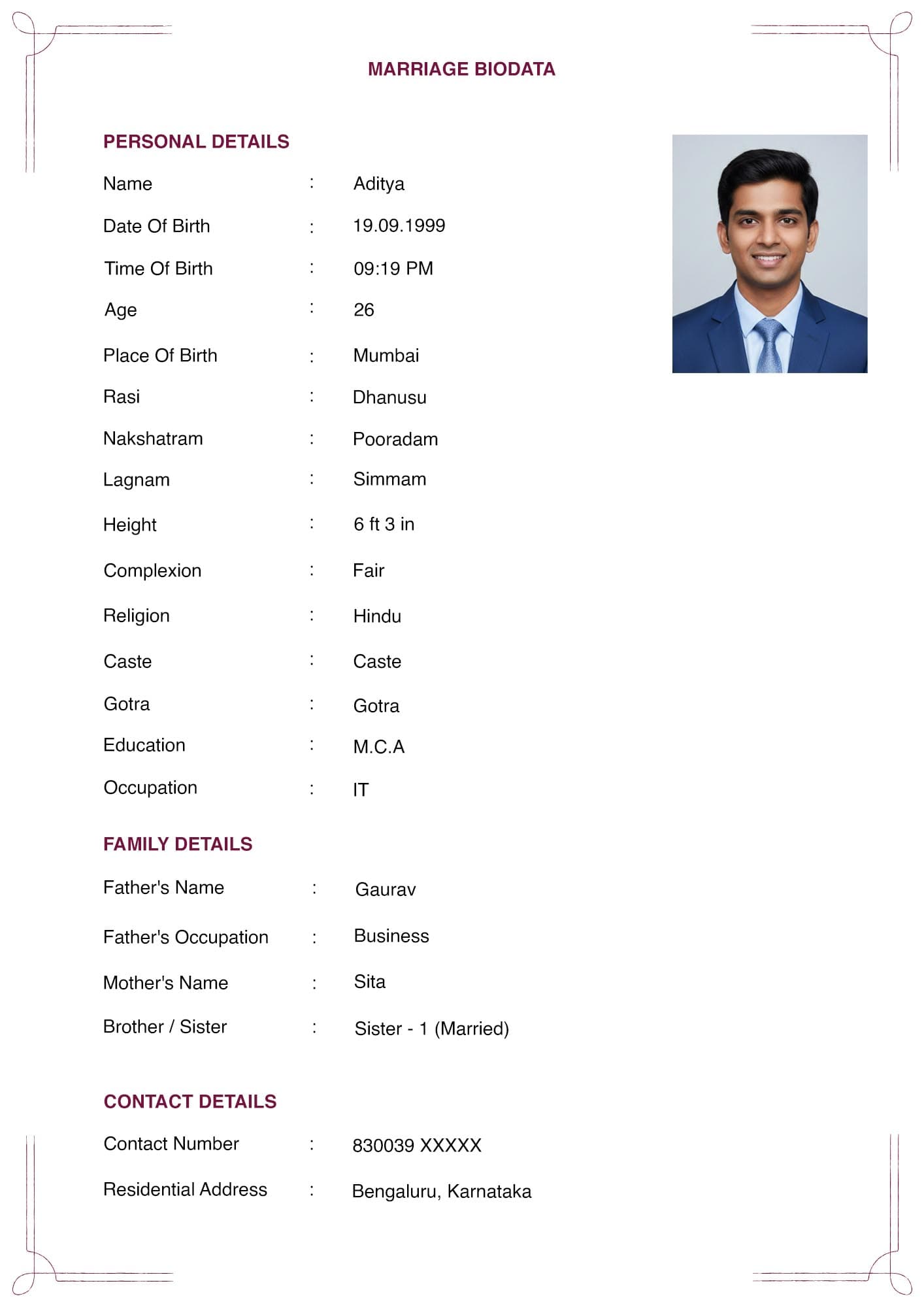
The photo is read before any line of text. It is also the element people spend the least effort on, usually reaching for whatever is closest in their gallery.
Ten minutes and a blank wall solve most of it.
Quick Answer Use a recent photo, taken within the last year, in portrait orientation, against a plain background, in natural daylight. Minimum 600 by 800 pixels, taken from the original file rather than a WhatsApp forward. Face clearly visible, no sunglasses, no filters, no group crops. Dress as you would for a first meeting.
Size and Resolution
- Printed size: roughly passport size, about 35 by 45 mm, placed top right beside the personal details.
- Digital resolution: at least 600 by 800 pixels. Higher is fine. This is the number that determines whether the printed copy looks sharp or soft.
- Orientation: portrait. A landscape photo in a portrait slot gets either squashed or cropped through the middle of your face.
- Source file: the original. This matters more than any other setting on the page. Every time an image passes through WhatsApp, it is re-compressed. A photo forwarded three times has lost detail permanently, and no amount of enlarging brings it back. Go to the camera roll, the email, or the cloud backup where the original sits.
Taking a Usable Photo
You do not need a studio. You need a wall and good light.
- Background. A plain wall. Light grey, cream, or white works best. Avoid patterned curtains, bookshelves, parked vehicles, and anything with writing on it.
- Light. Daylight, indoors, near a window, facing the window. Avoid direct overhead sunlight, which casts hard shadows under the eyes. Avoid a window directly behind you, which turns you into a silhouette.
- Distance and framing. Head and shoulders, or head to mid-chest. The face should occupy a good portion of the frame. A full-length shot shrinks the face to almost nothing at passport size.
- Camera height. Roughly at eye level. A phone held low creates an unflattering upward angle.
- Expression. A relaxed, natural expression. A slight smile is fine and reads as approachable. A stiff, unsmiling passport-office face is not required here.
- Clothing. What you would wear to a first meeting. Traditional or formal both work depending on your family. Avoid busy patterns, which distract at small size, and avoid pure white against a white wall, which merges.
Take ten. Pick one. It costs nothing.
The Eight Common Mistakes
- A cropped group photo. Someone else's shoulder or hand is still visible at the edge. Families notice immediately, and it reads as careless.
- A wedding or function photo. Heavy makeup, formal jewellery and event lighting are not representative. The photo should look like you on an ordinary day.
- Sunglasses or a cap. The face needs to be visible. This should not need saying, and yet it appears regularly.
- Heavy filters or beauty modes. Smoothing filters look obviously artificial at print size, and they create an awkward moment at a first meeting.
- A photo more than a year old. People change. A photo from five years ago sets up an uncomfortable first impression.
- A screenshot of a photo. Screenshotting your own gallery image drops resolution and often adds interface elements. Use the file.
- A WhatsApp-forwarded image. Covered above. The single most common cause of blurred printed biodatas.
- A selfie taken at arm's length. The perspective distortion is visible, and the angle is usually wrong. Ask someone to take it, or use a timer and prop the phone.
Should the Photo Be on the Biodata at All?
It is not compulsory. It is expected in almost every case, and a biodata without one usually prompts a request for it within a message or two.
There is a legitimate middle path. If you would rather not have your photo circulating through forwarded WhatsApp groups, send the biodata without it. Share the photo separately once a conversation has begun with a specific family.
Say so on the document if you do this. A line such as "Photo shared on request" prevents the impression that you simply forgot.
This is worth thinking about, because the photo travels further than the text. See [INTERNAL-LINK: sending a biodata on WhatsApp → spoke D1] for how far these files typically go.
Two Photos, or One?
One on the biodata itself. That is the convention.
Some families keep a second, full-length photo to share separately when asked. That is common and reasonable. It does not belong on the one-page sheet, where it would displace content and shrink both images.
If you attach a second photo, send it as a separate file rather than adding a page to the biodata.
Frequently Asked Questions
What size should a marriage biodata photo be?
About 35 by 45 mm printed, which is roughly passport size. Digitally, at least 600 by 800 pixels so it prints sharply.
Can I use a passport photo for a marriage biodata?
Yes, if it is recent and you look natural in it. Passport photos are usually stiff and unsmiling, which is acceptable but not ideal. A relaxed photo against a plain wall generally reads better.
Is a photo compulsory on a marriage biodata?
No, but nearly every family expects one. If you prefer not to circulate it widely, send the biodata without it and note that the photo is available on request.
Why does my biodata photo look blurry when printed?
Almost always because the image came from a WhatsApp forward. WhatsApp compresses images on every send. Use the original file from your camera roll.
Can I use a photo from a wedding or family function?
It is not ideal. Event photos have heavy makeup, formal dress and unusual lighting, none of which represent how you normally look.
Should I smile in a biodata photo?
A relaxed, slight smile works well. This is an introduction, not an identity document.
In Short
- Recent, portrait, plain background, natural daylight, at least 600 by 800 pixels.
- Always use the original file. Never a WhatsApp forward or a screenshot.
- Avoid cropped group photos, sunglasses, heavy filters, and event photos.
- One photo on the sheet, top right. A full-length shot goes separately if asked for.
Once the photo is right, check the output settings in [INTERNAL-LINK: print-ready A4 biodata → spoke C2], and see [INTERNAL-LINK: common biodata mistakes → spoke D3] for the errors that surface most often.